Game optimizer tool for mobile
XBoost - GameSpace is a free game utility application for mobile devices by developer AppSamuraiDev. It's an optimizer tool that helps users boost the performance of their device while gaming to get the best gameplay experience possible. It boasts easy one-tap operation and provides various helpful system statistics.
Top Recommended Alternative

XBoost - GameSpace comes with features and tools designed to reduce background processes by managing active apps and system resources in real time. It monitors your device’s RAM usage, CPU load, and device temperature to create a smoother and more stable gaming experience, especially during longer play sessions or resource-heavy games.
Easy game optimizations
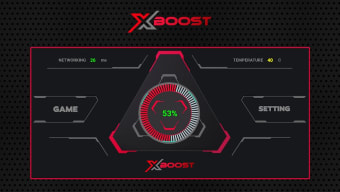
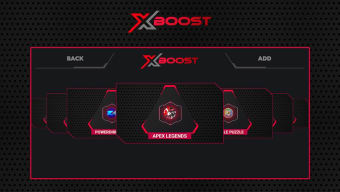
Upon opening the XBoost - GameSpace app, the main page will display vital system stats like RAM usage at the center, as well as network ping and device temperature at the top left and right corners, respectively. This allows users to monitor their device’s performance before launching a game. Tap on the Game button, and it will show you a list of games you can add for optimization.
Go into Settings, and you can enable Auto Optimizations for any game you have already added, and access a White List to add apps you want to keep running in the background even while playing. These give you more control over how the app manages resources. Now, as is the case with most of these game optimizers, results will vary depending on the device itself, so manage your expectations.
This app gives users a simple and accessible way to optimize performance even without having proper knowledge of system tuning. The interface is designed to be welcoming, with a quick setup and easy toggles rather than complex configurations that take time to tweak. While it won’t boost low-end devices’ performance greatly, the small improvements still provide some form of stability.
For smoother gameplay
If you've been experiencing some lag and slowdowns while playing your favorite games, XBoost - GameSpace is an optimizer tool that can help you out. It's easy to use and can work with pretty much any game out there. It focuses on reducing system resources and prioritizing performance while a game is running. Just know that it's still limited to what your device is capable of.